BLOG
10 Reasons Customers Abandon Checkout and How to Fix Them
Learn why customers abandon checkout and discover practical strategies to reduce friction, improve payments, and increase ecommerce conversions.

Author
XPay
August 28, 2026
BLOG
Learn why customers abandon checkout and discover practical strategies to reduce friction, improve payments, and increase ecommerce conversions.
August 28, 2026
.webp)
A customer finds your product, adds it to their cart, starts checkout, and then disappears.
For ecommerce businesses, this is one of the most frustrating moments in the customer journey. You have already paid to attract the visitor, convinced them to consider the product, and brought them all the way to the checkout page. Yet, something in those final steps makes them leave without completing the purchase.
This is known as checkout abandonment.
According to Baymard Institute research, the average online shopping cart abandonment rate is around 70%. Not every abandoned cart can be prevented; some shoppers are simply browsing or comparing prices, but many abandonments happen because of avoidable friction in the checkout experience.
The good news is that most checkout problems can be identified, measured, and fixed.
In this guide, we'll look at 10 common reasons customers abandon checkout and practical ways ecommerce businesses can reduce preventable abandonment.
Checkout abandonment occurs when a customer starts the checkout process but leaves before completing the purchase.
It is slightly different from cart abandonment.
Cart abandonment happens when someone adds a product to their cart but doesn't complete the purchase.
Checkout abandonment specifically refers to customers who have moved further into the purchasing process but leave before the transaction is completed.
This distinction matters because someone who reaches checkout has usually demonstrated stronger purchase intent. If these customers are leaving, the problem may be related to the checkout experience, payment process, shipping information, trust, or technical issues.
.webp)
One of the biggest reasons customers abandon an online purchase is discovering additional costs they weren't expecting.
A customer might see a product priced at PKR 3,000, decide they're willing to pay that amount, and proceed to checkout. Then they see:
Suddenly, the purchase feels more expensive than expected.
Be transparent about costs throughout the shopping journey.
Instead of revealing important charges only at the final step:
The goal is simple: the price customers expect should be as close as possible to the price they actually pay.
Transparent pricing reduces surprises and helps customers make a confident purchase decision.
A customer shouldn't need to complete a questionnaire to buy a pair of shoes.
Yet many ecommerce checkouts ask for unnecessary information, require account creation, contain multiple pages, or force customers through confusing steps before they can pay.
Every additional step creates another opportunity for the customer to leave.
A complicated checkout can include:
Start by asking a simple question:
Do we really need this information to complete the order?
Remove anything that isn't necessary.
You can also:
A shorter checkout doesn't necessarily mean putting everything on one page. The objective is to remove unnecessary friction, not simply reduce the number of screens.
.webp)
Customers are being asked to give you something valuable: their money and, in some cases, sensitive payment information.
If the payment experience suddenly looks unfamiliar, insecure, or disconnected from the website they were shopping on, customers may hesitate.
For example, imagine a customer shopping on a familiar e-commerce website. When they click "Pay," they're suddenly redirected to an unfamiliar-looking page with different branding.
That transition can create uncertainty:
"Is this payment page legitimate?"
Make the payment experience feel like a natural continuation of the shopping experience.
Businesses should:
This is where the underlying payment infrastructure becomes important.
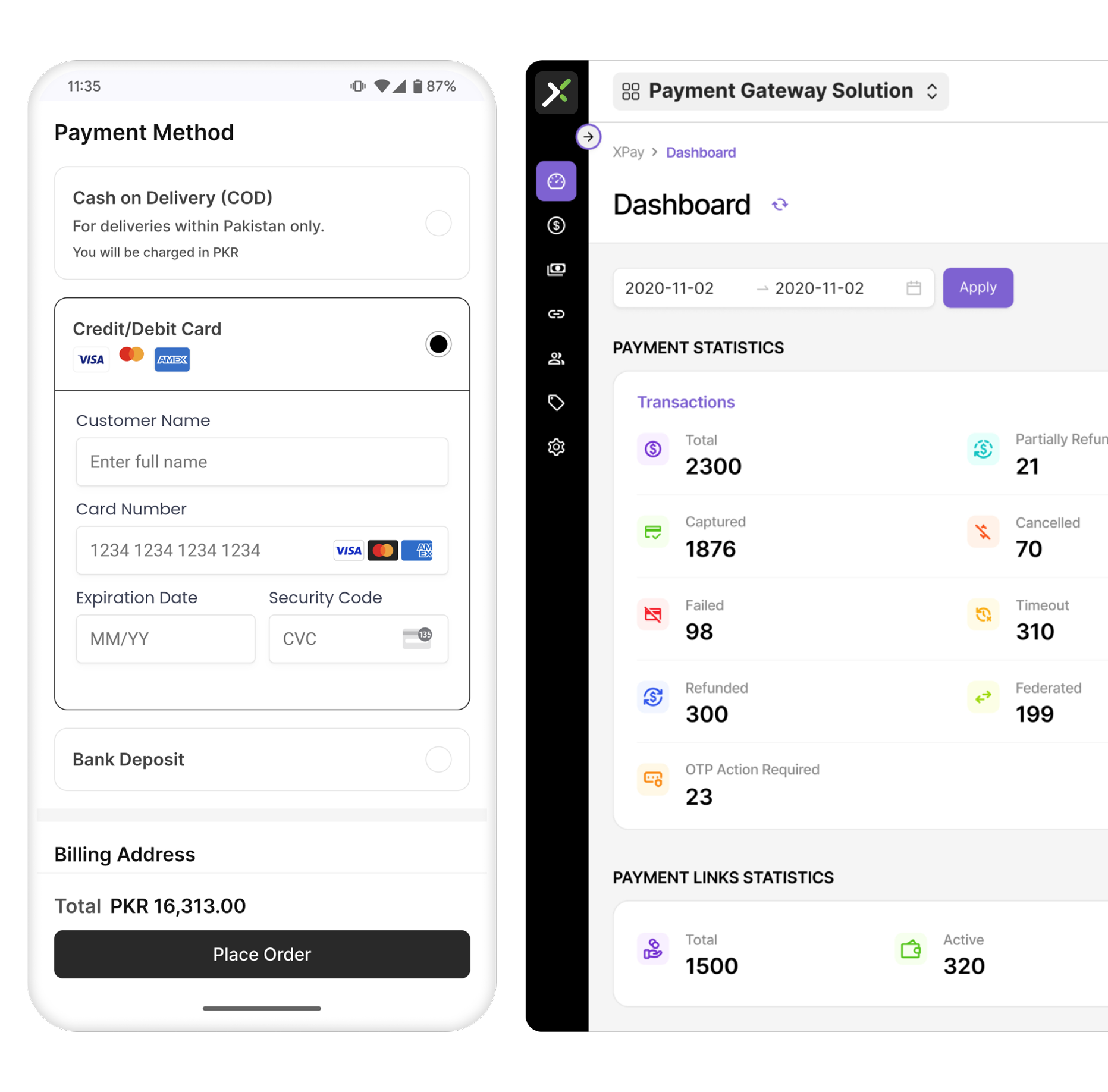
An on-site checkout can help keep the customer within the merchant's website instead of sending them through multiple external pages.
For example, XPay by PostEx provides an on-site checkout experience designed to keep the payment process within the merchant's website, helping businesses maintain a consistent checkout experience from product selection through payment.
The objective isn't simply to make payments possible. It's to make the payment step feel like a seamless part of the customer's purchase journey.
A customer may be completely ready to purchase but still abandon checkout because their preferred payment method isn't available.
Different customers have different payment preferences.
Depending on your market and audience, customers may expect options such as:
If the only available option doesn't work for the customer, the sale may be lost.
Understand how your customers actually prefer to pay.
Review your transaction data and identify:
Then provide the payment methods that make sense for your target audience.
For ecommerce businesses, managing multiple payment methods can become technically complicated when every method requires a separate integration.
A payment solution such as XPay can simplify this by allowing merchants to connect multiple payment methods through a single payment integration.
This means businesses can give customers more ways to pay without building a completely separate payment infrastructure for every payment method.
Sometimes the customer hasn't abandoned the purchase.
The payment failed.
From the customer's perspective, however, the result can look exactly the same.
They click the payment button, something goes wrong, and they leave.
Payment failures can happen because of:
Even a small percentage of failed transactions can represent significant lost revenue when your business processes thousands of orders.
.webp)
First, don't treat every failed transaction as the same problem.
Track and classify payment failures.
For example:
Businesses should also make it easy for customers to recover from a failed payment.
Instead of displaying:
"Payment failed."
Give customers a useful next step:
"Your payment couldn't be completed. Please try again or choose another payment method."
Payment infrastructure can also play a role here.
XPay's dynamic routing capability is designed to route transactions through available payment channels to improve payment acceptance and transaction reliability.
For businesses, this means payment optimization doesn't stop at the checkout design. The infrastructure processing the transaction matters too.
Imagine you've found the product you want, you're ready to pay, and the website says:
"Create an account to continue."
Some customers will do it.
Others will simply leave.
Mandatory account creation adds friction, particularly for first-time buyers who don't yet have a reason to create a long-term account.
Consider offering a guest checkout.
Customers should be able to:
You can still encourage account creation by explaining the benefits:
But don't necessarily make registration a prerequisite for buying.
A customer came to your website to purchase a product, not to complete a registration form.
For many ecommerce businesses, mobile isn't a secondary channel.
It's the primary shopping device.
Customers may discover your product through:
Then they open the product page on their phone and attempt to complete the purchase.
If the checkout experience is difficult on mobile, you can lose customers at the most valuable point in the funnel.
Test the complete checkout journey on an actual smartphone.
Don't only check whether the page technically works.
Try to place an order yourself.
Ask:
The best mobile checkout is one that feels almost effortless.
Customers want certainty before they click the final payment button.
If the checkout doesn't clearly show the final amount, they may hesitate or leave.
A good checkout should make the calculation easy to understand:
Product price + shipping + applicable charges = total amount
The customer shouldn't have to calculate it themselves.
Keep the order summary clear and visible.
Include:
If a discount has been applied, show it clearly.
For example:
Subtotal: PKR 5,000
Discount: -PKR 500
Shipping: PKR 250
Total: PKR 4,750
This gives customers confidence that there won't be another surprise when they click "Pay."
A customer can have every intention of purchasing and still fail to complete the transaction because something breaks.
This is particularly damaging because the customer has already demonstrated strong purchase intent.
Common technical problems include:
Your checkout needs monitoring just like any other critical business system.
Track:
Checkout started → Payment initiated → Payment successful → Order confirmed
Then identify where customers are dropping off.
For example:
If 10,000 customers initiate checkout but only 8,000 reach the payment stage, you have a checkout problem.
If 8,000 attempt payment but only 6,500 transactions succeed, you have a payment conversion problem.
That distinction is important.
Your analytics should help you understand where the customer is being lost and why.
Payment platforms can also provide visibility into transaction performance.
XPay provides payment infrastructure and transaction insights that can help merchants understand payment activity and identify issues affecting transaction performance.
The goal is to move from:
"We are losing customers at checkout."
to:
"We know exactly where and why customers are dropping off."
Here's an important point:
Not every abandoned checkout is a checkout problem.
Some customers are simply browsing.
They might be:
A customer can reach the checkout without being fully committed to purchasing.
Trying to eliminate 100% of abandonment is therefore unrealistic.
Instead of focusing only on preventing abandonment, build a system to recover high-intent customers.
For example:
The objective is not to pressure every customer into buying.
It's to give customers who genuinely wanted the product an easy path back to their purchase.
Reducing checkout abandonment requires more than changing one button or adding another payment method.
Think about the complete journey.
The biggest improvements often come from removing small points of friction across the entire journey.
Most businesses think of checkout optimization as a UX problem.
But there's another layer that is easy to overlook:
the payment infrastructure behind the checkout.
You can have a beautifully designed checkout page, but if payments fail, customers are redirected unexpectedly, or their preferred payment method isn't available, the conversion still doesn't happen.
That's why ecommerce businesses should evaluate both sides of checkout:
Checkout experience + payment infrastructure
Redirecting customers to an unfamiliar payment page can introduce friction.
XPay's on-site checkout is designed to keep customers within the merchant's website during the payment process, helping businesses maintain a consistent branded experience.
This can make the transition from:
Product → Cart → Checkout → Payment
feel like one continuous journey.
Customers have different preferences.
Instead of relying on one payment method, businesses can provide multiple ways to complete a transaction.
XPay enables merchants to connect different payment methods through a single payment integration, helping businesses simplify their payment setup while giving customers more choice.
Payment failures don't always mean that the customer isn't willing to pay.
Sometimes the issue is related to the payment channel processing the transaction.
XPay's dynamic routing capability is designed to intelligently route transactions through available payment channels, helping businesses improve payment acceptance and reduce avoidable payment failures.
For businesses with repeat customers, making every payment feel like a completely new transaction can add unnecessary friction.
Tokenization allows payment credentials to be represented by secure tokens rather than repeatedly handling the underlying payment details.
This can support smoother experiences for customers who make repeat purchases.
Payment optimization requires data.
Businesses need to understand:
With better payment visibility, businesses can identify problems that wouldn't be visible from basic website analytics alone.
The easiest way to think about checkout optimization is:
You don't necessarily need more visitors. You need more of the visitors you already have to complete their purchases.
If 100 customers reach your checkout and 70 leave, improving checkout conversion can create additional orders without increasing your advertising spend.
That's why checkout should be treated as a conversion channel not simply the final page of your website.
Start by identifying where customers drop off.
Then ask:
Is it price?
Is it shipping?
Is it trust?
Is it UX?
Is it mobile usability?
Is it payment availability?
Is it payment failure?
Is it a technical problem?
Once you know the reason, you can fix the right problem.
Checkout abandonment is unavoidable to some extent, but a significant amount of preventable abandonment comes from friction that ecommerce businesses can identify and remove.
Start with the fundamentals:
And don't overlook the payment infrastructure behind your checkout.
A smoother checkout experience combined with reliable payment processing can help turn more high-intent shoppers into completed orders.
For ecommerce businesses looking to improve the payment experience, XPay by PostEx provides on-site checkout, multiple payment methods, dynamic routing, tokenization, and payment infrastructure built for online businesses.
Ready to reduce payment friction and improve your checkout experience?
Offer customers a faster, secure checkout experience without redirects. From cards and wallets to payment links. XPay helps you reduce drop-offs and get paid reliably.
Get Free Demo




.svg)