Buy Now Pay Later (BNPL) at Checkout: How It Works for Online Stores in Pakistan
Learn how BNPL checkout works for online stores in Pakistan. Explore the shopper journey, payment process, merchant dashboard and PostEx PayLater integration.
BNPL checkout means offering Buy Now Pay Later as a payment method on your store's checkout page, next to cards, wallets and Cash on Delivery. The shopper selects it, passes a quick eligibility check, pays the first instalment and gets the order. The BNPL provider collects the remaining payments.
In Pakistan, PostEx PayLater is live on checkout. Shoppers see it as "PostEx PayLater | Pay in 3 easy payments" and pay over 60 days, with no credit card needed.
How BNPL checkout works: the shopper's journey
Add to cart and go to checkout. The shopper enters contact and delivery details as usual.
Choose BNPL as the payment method. On the payment step, the shopper selects PostEx PayLater.
Get redirected to the BNPL provider. The shopper completes sign-up or sign-in and the eligibility check with PostEx PayLater.
Pay the first payment. One-third of the order is paid by debit or credit card, confirmed with OTP.
Return to the store. The order is confirmed and the merchant ships it.
Pay the rest later. The shopper pays the second payment after 30 days and the third after 60 days, managed in the PostEx PayLater app.
For the shopper, it feels like any other online payment, just a smaller one.
BNPL checkout concepts, explained simply
Term
What it means at checkout
Payment method
The option the shopper picks to pay: card, wallet, COD or BNPL. BNPL appears as one more option in the list.
Redirect
The shopper briefly leaves your checkout to complete the BNPL step with the provider, then returns to your store.
Eligibility check
The provider decides whether the shopper can use BNPL for this order. For PostEx PayLater, that includes age 18+, a valid CNIC and a card.
First instalment
The upfront part of the price paid at checkout. With PostEx PayLater it is one-third, and it confirms the order.
OTP
The one-time password the shopper's bank sends to approve the card payment.
Capture
The moment the payment is successfully taken. Only captured payments count as completed orders.
Instalment plan
The remaining payments, due at 30 and 60 days. The shopper owes PostEx, not your store.
Settlement
When the provider pays out to you, as shown in your invoices.
Refund
If an order is returned and refunded, the shopper's remaining payments are adjusted.
What PostEx PayLater looks like on a Shopify checkout
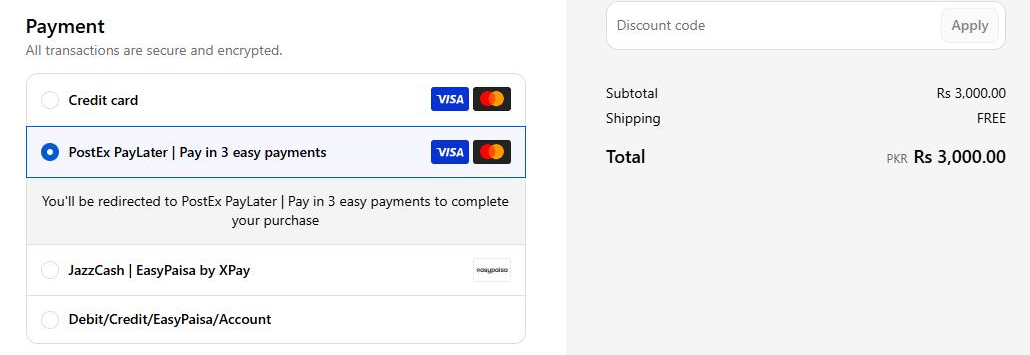
PostEx PayLater is live on Shopify. Here is how it appears on the payment step of a PostEx demo store:
Shopify checkout on a PostEx demo store, November 2026.
What the shopper sees:
PostEx PayLater | Pay in 3 easy payments listed with the other payment methods
Visa and Mastercard logos, since instalments are paid by card
A note that they'll be redirected to PostEx PayLater to complete the purchase
Your other XPay methods, such as JazzCash and EasyPaisa, alongside it
Once the first payment is paid, the shopper returns to your store and the order is confirmed.
What you see as a merchant: the XPay dashboard
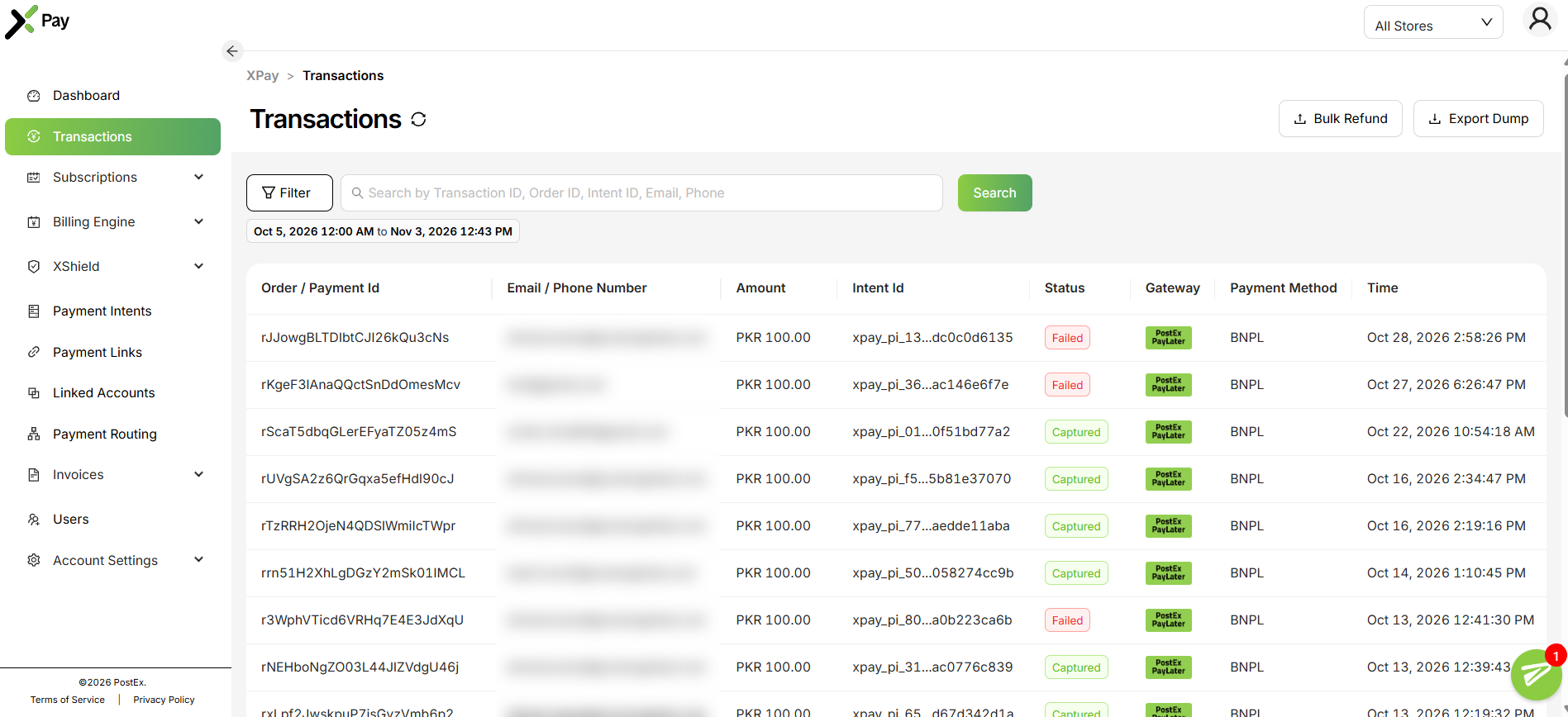
Every PostEx PayLater payment shows up in your XPay dashboard.
In Transactions, each BNPL payment is listed with gateway PostEx PayLater, payment method BNPL, its amount and its status: Captured for completed payments, Failed for ones that didn't go through.
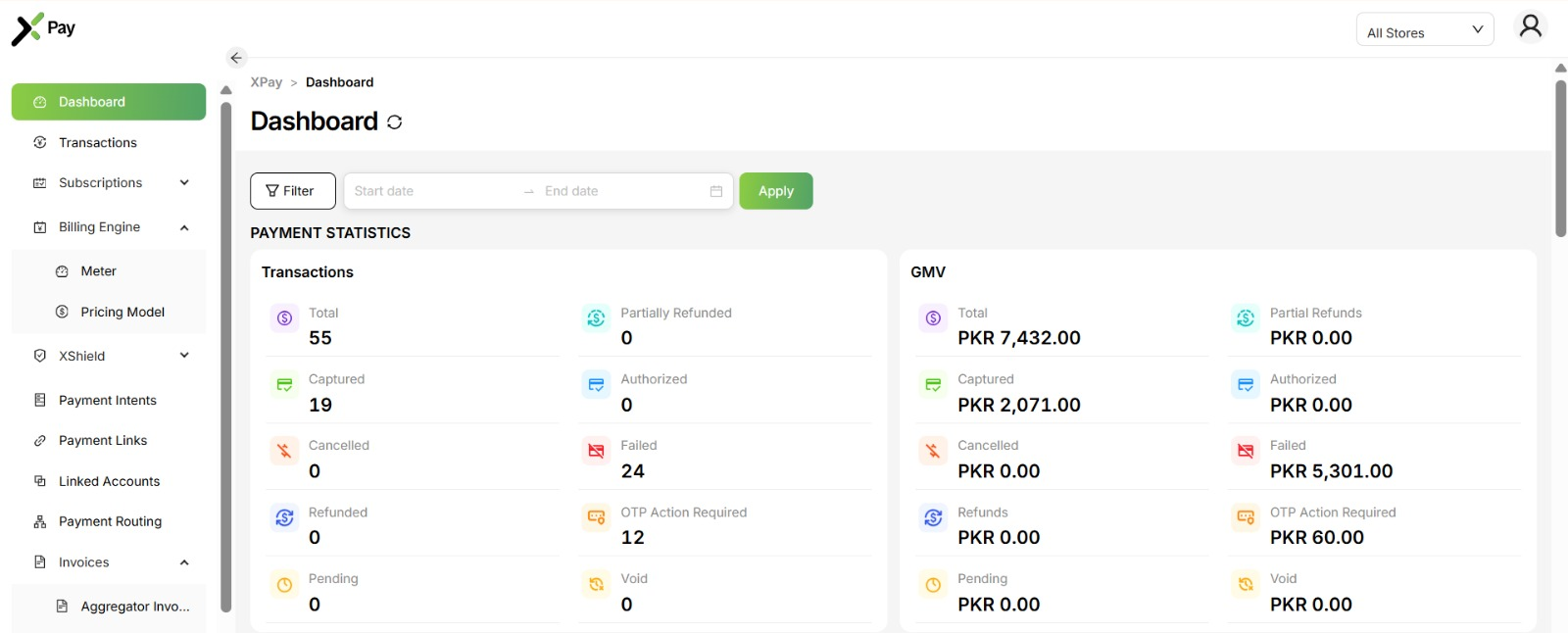
The Dashboard shows totals for any date range: captured payments, failed payments and those waiting on OTP Action Required, by count and by value. Under Invoices > Paylater Invoices, you can see what PostEx PayLater owes you.
To learn which numbers to track, read our guide on how to measure BNPL performance at checkout.
6 best practices for a BNPL checkout that converts
Show BNPL before checkout. Display "Pay in 3: Rs. 1,000 today" on product and cart pages so shoppers know before they reach payment.
Use a clear label. "PostEx PayLater | Pay in 3 easy payments" tells shoppers exactly what they get.
Place it near the top. Put BNPL high in the payment list so it isn't missed.
Explain the redirect. A short note that shoppers will return to your store after paying reduces drop-off.
Answer doubts upfront. Add "No credit card needed" and "Shariah-compliant" near the option.
Watch failed and OTP payments. A rise in Failed or OTP Action Required in XPay points to friction worth fixing.
Frequently asked questions
What is BNPL checkout?
BNPL checkout is when Buy Now Pay Later appears as a payment method on your online store's checkout, so shoppers can pay part of the price now and the rest in instalments.
How does BNPL work at checkout?
The shopper selects BNPL, completes a quick eligibility check with the provider, pays the first instalment and returns to your store. The provider collects the remaining payments.
Is PostEx PayLater available on Shopify?
Yes. PostEx PayLater is live on Shopify checkout as "PostEx PayLater | Pay in 3 easy payments".
Do shoppers need a credit card for BNPL checkout?
No. PostEx PayLater instalments can be paid with a debit card.
Who collects the remaining instalments?
PostEx does. The shopper pays the second and third instalments to PostEx PayLater, not to your store.
Where do I see BNPL payments as a merchant?
In your XPay dashboard: Transactions shows each PostEx PayLater payment, and Invoices > Paylater Invoices shows what you are owed.
Is BNPL checkout Shariah-compliant?
PostEx PayLater is. It uses a Murabaha (cost-plus sale) model approved by PostEx's Shariah Advisor / Shariah Board, with no interest.
Add BNPL to your checkout
BNPL checkout gives your shoppers a smaller payment today and gives you a confirmed, part-paid order. With PostEx PayLater on your Shopify store, it is one more option on your payment page, and every payment is tracked in XPay.
Want PostEx PayLater on your checkout?
Contact the XPay team or your PostEx account manager to start your integration, or learn more at postexpaylater.pk/business.
Start accepting payments directly with XPay
Offer customers a faster, secure checkout experience without redirects. From cards and wallets to payment links. XPay helps you reduce drop-offs and get paid reliably.